
“Can I actually afford this?”
Having enough today isn’t the same as affording it. Add the purchase on the day you’d make it and see what it leaves you for every day after.
Your safe-to-spend number, on a calendar
Having money in your account isn’t the same as knowing it’s safe to spend.
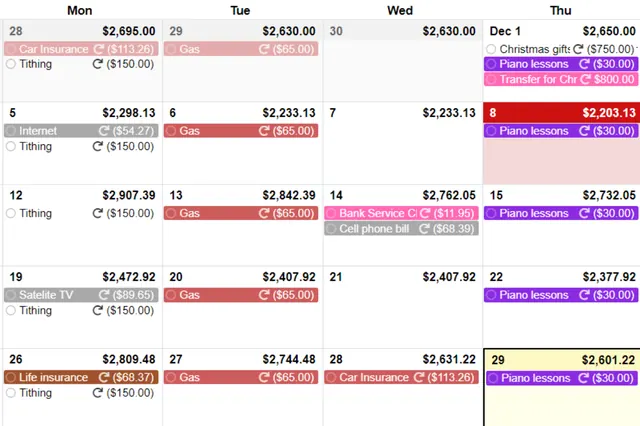
Your bank shows today. CalendarBudget puts every bill and payday on a calendar and forecasts your balance day by day — weeks, months, even years ahead — so you can stop guessing.
Affiliate disclosure: Proper Limit is an independent site. If you sign up through our links we may earn a commission, at no extra cost to you.
“Can I really trust my bank balance?”
Your bank balance isn’t wrong. It just shows what you have today, not what that money still has to cover. It can’t tell you what you can spend without coming up short when rent hits Thursday. That gap is where overspending hides.
$1,240 today
Looks fine. Next week’s bills are invisible until they hit.
Every day ahead
Bills and paydays sit on their real dates, so the number you see already counts what’s coming.
Quick check
Here’s the back-of-the-napkin version. Nothing you type leaves this page.
CalendarBudget does the real version: every bill and payday on its actual date, with a projected balance on every day of the calendar.
See it in action
The official overview from CalendarBudget. Tap to play — the video only loads when you ask for it.
▶ CalendarBudget in 90 secondsVideos and product images © CalendarBudget Inc., from calendarbudget.com and the official CalendarBudget YouTube channel.
How it works
One-time or repeating, each on the date it really happens. In the USA and Canada you can also connect your bank for automatic import.
The calendar forecasts your balance day by day, so you spot the tight days weeks before they arrive.
Before you buy, check the days ahead. If every day stays above zero after the purchase, you can afford it.
Sound familiar?
Having enough today isn’t the same as affording it. Add the purchase on the day you’d make it and see what it leaves you for every day after.
See your projected balance on every day until more money comes in, with bills already counted. Split what’s left into a daily spending limit that actually holds.
A lot of “surprises” were coming all along. With bills on the calendar weeks ahead, plus bill reminders, you can make room before they hit.
Weekends are where it slips. Check your number on Friday, spread it across the weekend, and know Monday’s bills are already covered.
It’s rarely one big purchase. Spending reports and graphs show where it went, and the calendar shows what everyday spending does to your balance ahead.
Stop running the numbers in your head. Plan months ahead, or up to 10 years, so holidays, trips and big purchases are planned instead of guessed.
In their words
Quoted from testimonials published on calendarbudget.com. Not collected by Proper Limit.
“The forecasting piece is hands down my favourite. I have tried Mint, YNAB, Excel Spreadsheets – nothing forecasts like this.”
“I can play around with when to pay bills and see how each decision will impact my overall budget for the month.”
“I was living with this uneasy feeling all the time wondering if I forgot about something. That feeling is gone.”
Simple pricing
No up-front payment and no credit card needed to start. Keep it only if it helps.
Prices as listed on calendarbudget.com/pricing (checked Oct 28, 2026). CalendarBudget sets and may change pricing.
Every membership includes
CalendarBudget can’t move money between or out of your accounts.
All communication with CalendarBudget is encrypted.
Built by a co-founder who’s used it for his own household for 15+ years.
Source: CalendarBudget’s Security & Privacy page and its co-founder bio.
FAQ
No. CalendarBudget’s trial is 30 days, with no credit card needed and no up-front payment. You can cancel anytime.
$11.99 USD a month, or $89.99 USD a year, as listed on CalendarBudget’s pricing page. Pricing is set by CalendarBudget, not Proper Limit.
No. You can add income and bills yourself or reconcile by importing your bank file. Bank connect with automatic import and categorization is available in the USA and Canada if you want it.
CalendarBudget is a read-only service. It can’t move money in or out of your accounts. Communication is protected with 256-bit SSL encryption. See CalendarBudget’s Security & Privacy page for details.
Your bank balance shows what you have today. It doesn’t show what that money still has to cover. CalendarBudget puts income and bills on a calendar and shows your projected balance on every day ahead, so you see what you can spend after what’s coming next week.
Many budgets track categories, not timing. CalendarBudget is built around when money actually comes in and goes out, so your plan matches what your money is doing week to week. The 30-day free trial is the easiest way to see if it fits you.
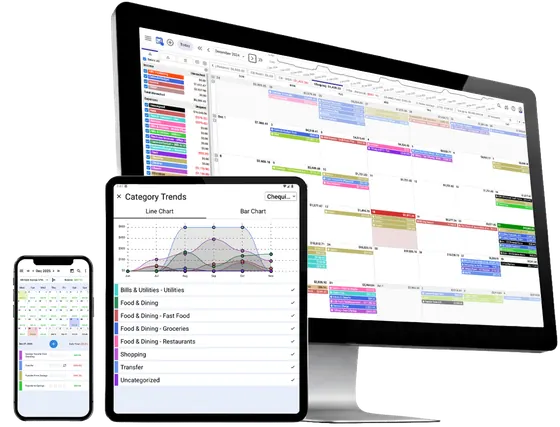
Yes. CalendarBudget works in a web browser and on iOS and Android.
Proper Limit is an independent site that recommends one tool: CalendarBudget. We’re not CalendarBudget and not affiliated with your bank. If you sign up through our links we may earn a commission, at no extra cost to you.
Put your bills and paydays on a calendar and see what you can safely spend today, and every day after.
Try CalendarBudget free for 30 days →No credit card needed · Cancel anytime · Then $11.99/mo or $89.99/yr